
We are Open

Mon-Fri 8:00-16:00

We are Open

Mon-Fri 8:00-16:00

Edit Template

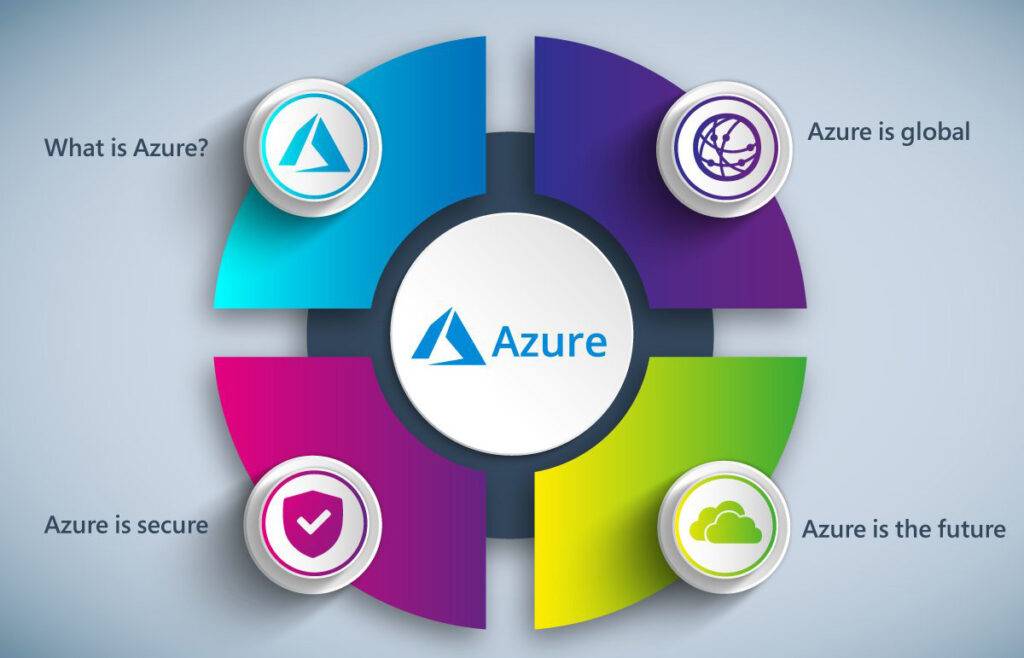
Microsoft Azure Cloud Services

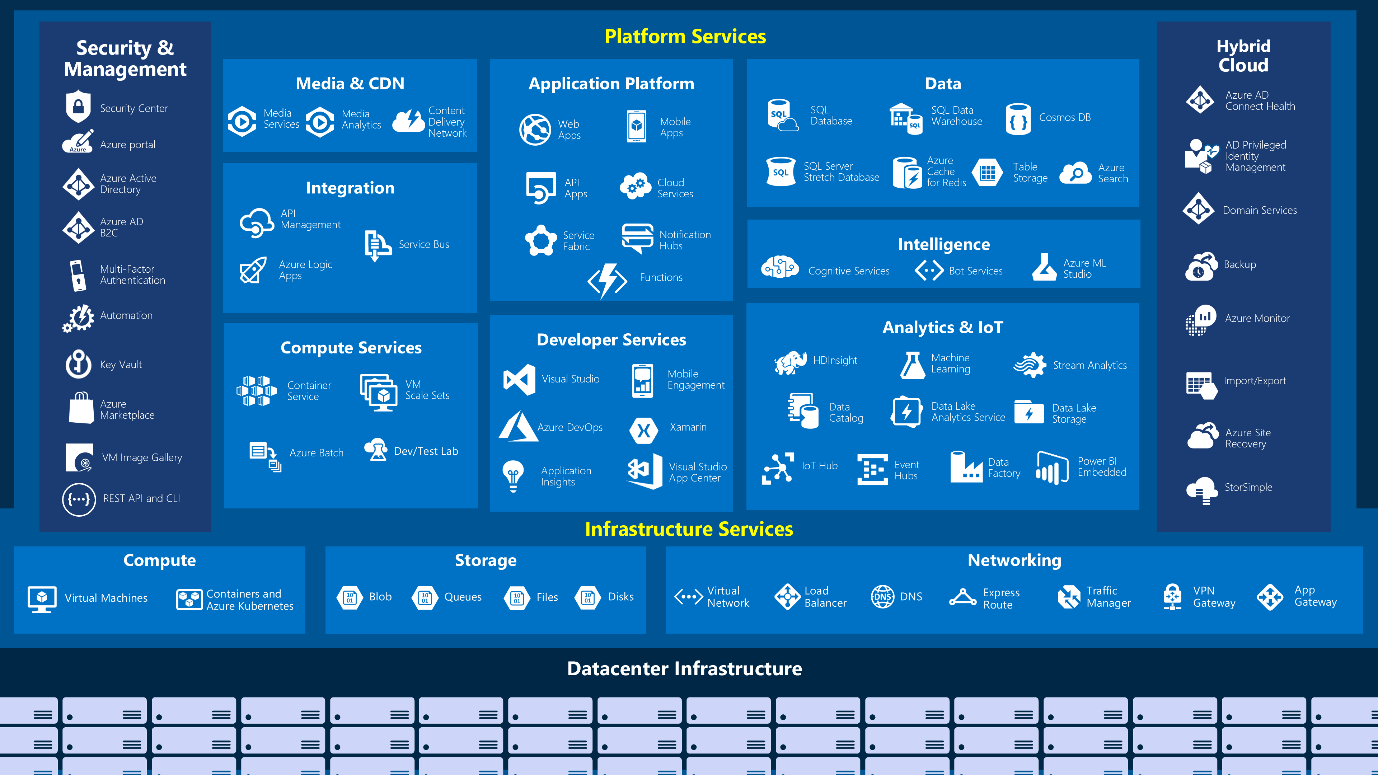
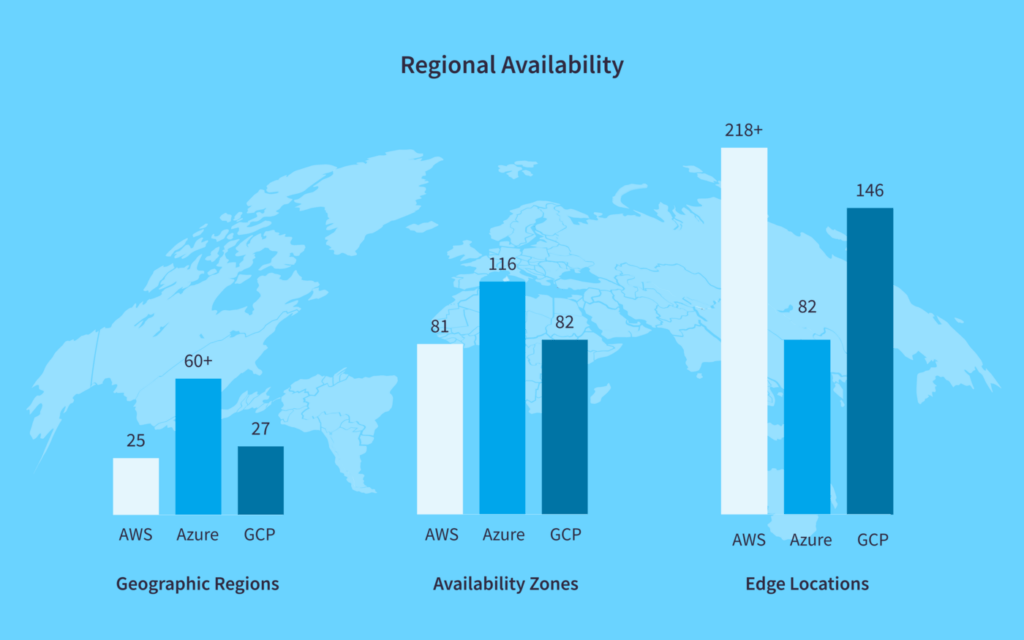
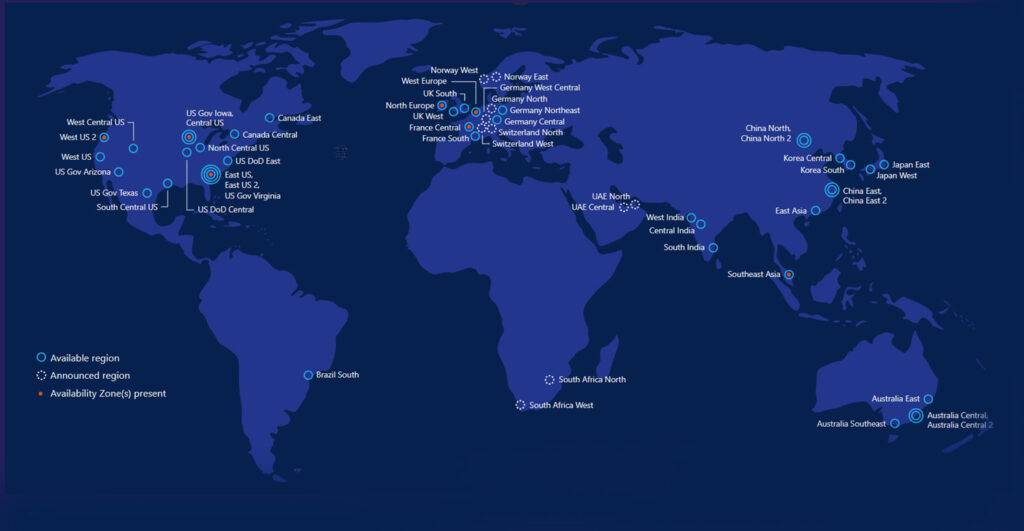
Microsoft Azure is a cloud computing service from Microsoft. Azure offers a range of software as a service (SaaS), platform as a service (PaaS) and infrastructure as a service (IaaS) options for deploying applications and services on Microsoft-managed data center infrastructure. Azure’s 50 operating regions are more than any other cloud provider.
What do I need to know about Microsoft Azure Cloud Services?

Microsoft Azure has more than a hundred services to help you quickly solve your toughest challenges. Azure’s agility and built-in Development Operations (DevOps) allow you to iterate quickly and deliver code using an end-to-end cloud development platform. Whatever language you utilize, whether Microsoft Azure’s Visual Studio Team Services or another open-source tool like Chef or Jenkins, you will be able to debug faster and easier than ever before.

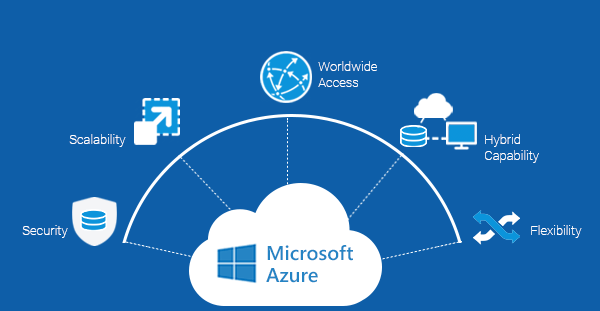
Microsoft Azure supports private cloud, public cloud, and hybrid cloud deployments. Azure’s robust Information Security (InfoSec) services provide general storage, database, and networking security, identity and access management, backup and Disaster Recovery (DR).

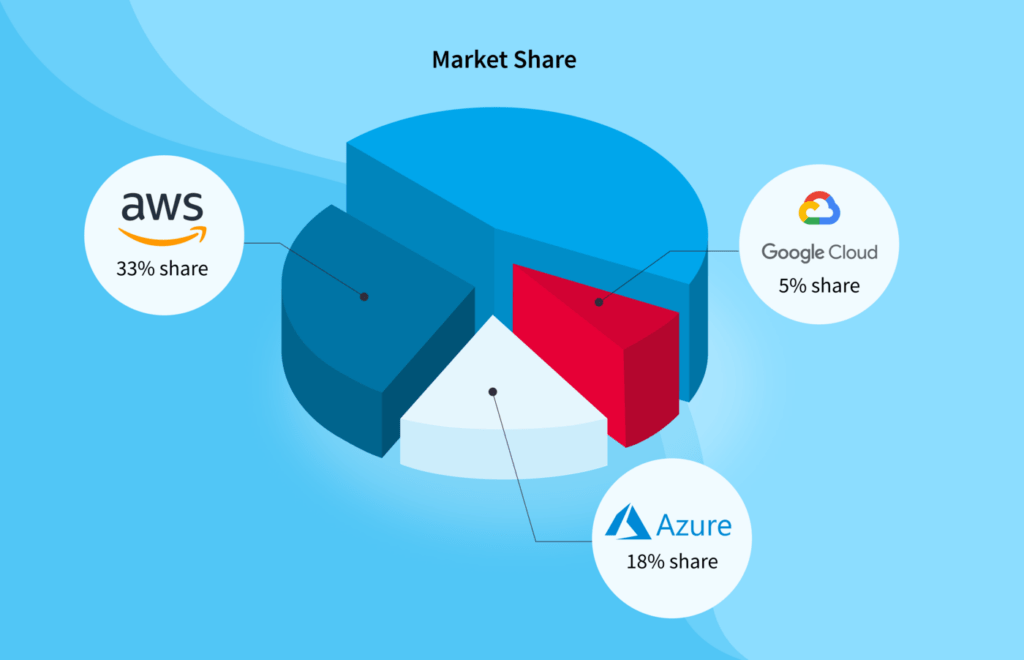
Azure is the No. 2 public cloud provider

Since its creation in 2008, Microsoft Azure has grown to become the second-largest of the top three public cloud platforms — just behind market leader Amazon Web Services (AWS) and ahead of Google Cloud Platform (GCP). 

As of the second quarter of 2021, AWS controlled 31% of the market, Microsoft Azure took 22%, and Google Cloud sat at 8% market share — according to Statista.

What can I do with Azure?

Microsoft Azure supports any tool, language, or framework: Node.js, Java, .NET, and more. Microsoft’s best-in-class development tools help you write great code. Visual Studio and Visual Studio Code are supported to improve your productivity.

Microsoft Azure offers more than 100 turn-key services, and the latest in AI and data to bring intelligence to your operations. More than 150 Azure Logic Apps connections are available right away, including favorites like Office 365, Dropbox, Google Services, Salesforce, and Twitter.

Azure is popular with enterprise organizations

Microsoft Azure is a popular pick in the enterprise space, with Microsoft claiming that 95% of Fortune 500 companies use Azure. 

Over the past few years, Microsoft has made moves that play to its unique strengths, using legacy footholds in organizations to ease reluctant organizations to the cloud. As a result, Azure adoption is increasing in enterprises while AWS adoption remains relatively flat .Historically, Azure has been the preferred choice for hybrid deployments. It is also well-regarded for its ability to sync well with legacy Microsoft solutions — the kind many businesses have been using for decades.

What Is Azure and Why Should I Choose It for Business?

Microsoft Azure runs on both PC and Mac. Azure can support applications as large and complex as you can make them. Continuous integration and continuous delivery (CI/CD) will shorten your development cycles. Move your test environments to the cloud so you can provision, spin up, and tear down environments in a flash.

Management tools like Azure portal, PowerShell, Bash, and REST APIs are available to meet your needs. Focus on your application and not infrastructure with support for application monitoring, log analytics, patching, backup, and site recovery.

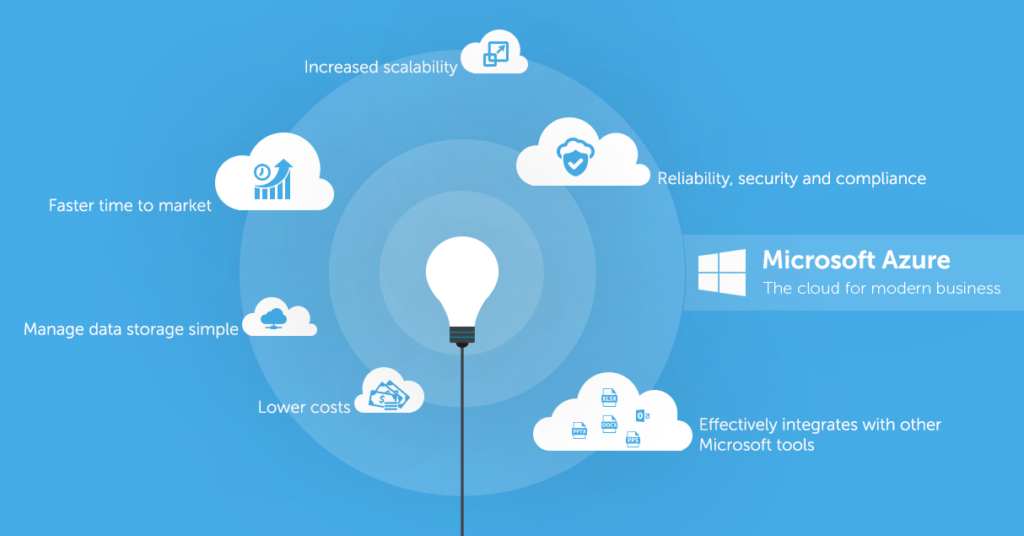
Microsoft Azure cloud services are trusted by a broad section of industries: over 90 percent of Fortune 500 companies run on Azure, along with government agencies and startups. Built-in security controls and analytics help you respond to threads, plug gaps, and agilely respond to changes in your security needs.

Microsoft has industry-leading certifications for privacy and security. Azure meets compliance standards like the General Data Protection Regulation (GDPR), HIPAA, HITECH, PCI-DSS, IRS-1075, SSAE 16, FedRAMP, SOC 1, SOC2, and ISO 27001. It also meets region-specific standards such as Australia IRAP, UK G-Cloud, and Singapore MTCS. The British Standards Institute and other third parties have verified strict adherence to these policies. Microsoft adopted the first global code of practice for cloud privacy, ISO/IEC 27018.

Usage and interest in Azure is growing

According to A Cloud Guru’s State of Cloud Learning report, cloud engineers are showing an immense increase in interest in Microsoft Azure courses and training at a rate much higher than interest in Google Cloud and AWS. ACG saw a rolling 3-month average of time spent on Azure learning up nearly 800% year-over-year, compared to between 50–100% for AWS and Google Cloud.

Migrating to the cloud (whether it be Azure or another cloud service provider) can save organizations and individuals the cost and complexity of purchasing and running resources on site.

The history of Microsoft Azure

Today, Microsoft Azure serves millions of applications, integrations, and customers. But its humble origins can be traced back to 2008 when it was announced as Project Red Dog.

The name “Azure” — for those who never got too deep into the jumbo-sized crayon box — is taken from a lovely shade of sky blue. (Sky. Cloud. Get it?)

Azure Infrastructure and Regions

At the time of publishing, Azure has 67 available and announced regions globally, more than 160 physical data centers, numerous availability zones, and millions of users. But how does it all work together?

When talking about cloud infrastructure, Azure has a global network of regions, availability zones, and data centers.

Azure regions are placed strategically all over the world to cover as large a percentage of the potential cloud customer as possible. Regions include Central U.S., Norway West, Brazil South, West India, South Africa North, Australia East, and everywhere in between. 

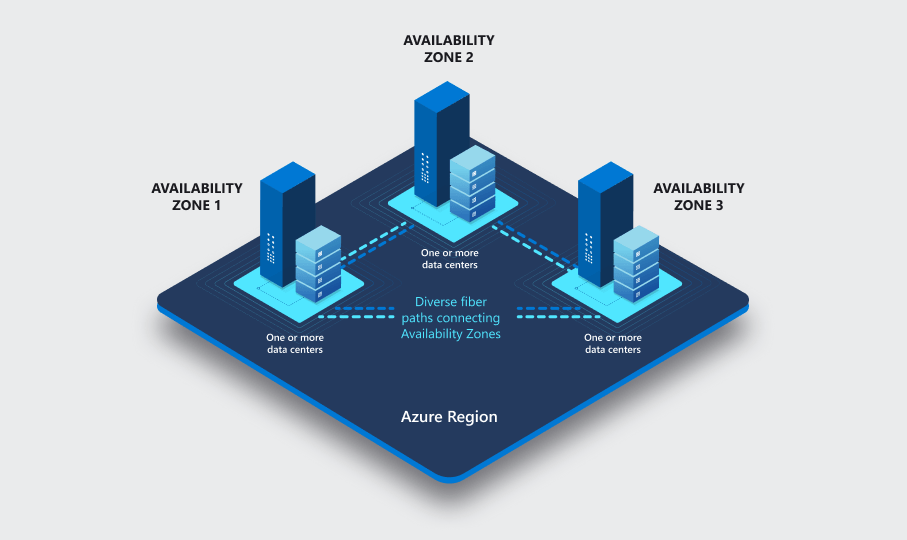
Each region consists of one or more data centers and availability zones, which are made up of one or more data centers equipped with independent power cooling and networking. This means that a service in an availability zone will keep running if one of the parts of the zone becomes unavailable. Nifty!

Azure also has geographies. These usually contain more than a single region and allow customers with specific data residency and compliance needs to keep the data and applications close. Geography is defined as a discreet market for doing just that.

Government regions

Azure also has government regions, which are only accessible to U.S. government bodies and their contractors. These regions are more stringent when it comes to compliance with government guidelines, and their locations are not disclosed.

Azure services can vary by region

Azure services are not all created equally either. Some require more resources than others and some just aren’t as popular. For this reason, not all services are offered in all regions. 

However, apart from the aforementioned government regions and newly established regions, most regions will have most of the Azure service catalog on offer. A few exotic services like Azure Machine Learning are sometimes only offered in one region within each geography. 

Azure IaaS vs SaaS vs PaaS

Infrastructure on Azure isn’t just a bunch of services. You need to understand the basic pillars: compute, network, and storage. 

Everything on Azure is built on top of those pillars, and they form a foundation for your cloud infrastructure too. You can build your own architecture from infrastructure-as-a-service (IaaS) products, such as Azure Virtual Networks, Azure VMs, Azure VDI, and Azure Disc Storage. Or you can take advantage of the platform-as-a-service (PaaS) offerings, such as Azure SQL and Azure app services. All are built on top of the pillars, but offer different layers of abstraction for you to build your business applications. 

Azure vs AWS and GCP: Is Azure right for you?

Comparing Azure to the other cloud providers, Azure falls in the top three of most popular alongside AWS and GCP. AWS has the most market share, but Azure has the most regions, and GCP is growing rapidly. 

The documentation for Azure to learn from is decent. Documenting a whole cloud computing platform is a large task and maintaining it is a constant exercise.

Azure pros and strengths

We’ve got to talk about strengths and weaknesses, because how else can you know which cloud platform will work best for you? While cloud computing as a concept is a way to offer various levels of abstraction through IaaS, PaaS, and SaaS, each cloud vendor is better at some things and less so at others. 

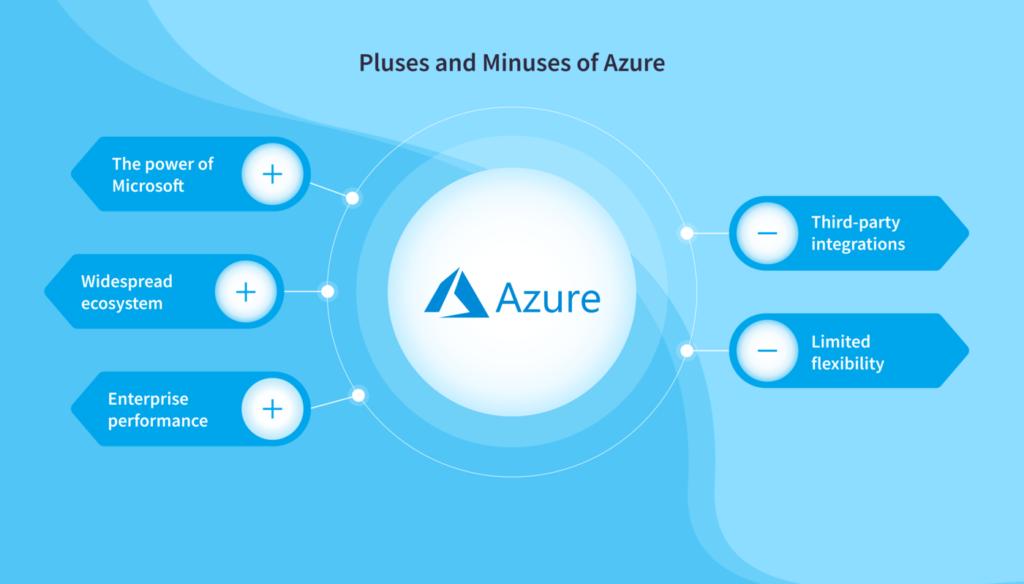
  • First, Azure has a lot of data centers, and they keep expanding. This means services and your applications will be closer to users. It also means specific legal requirements for certain countries when it comes to cloud computing are more likely to be met.
  • Because Microsoft has been supporting on-premises customers for 40-plus years, they have an extensive hybrid cloud offering to get all of their existing customers into the cloud. They also have a very good integration with existing tools and technologies such as Visual Studio, Active Directory, and File Storage.

If you have applications written in the .NET framework, Azure is almost a no-brainer as well. Azure has the most industry certifications of any cloud provider, and this can be useful for certain countries or industries when having to adhere to these.

Azure cons and weaknesses

While there aren’t many drawbacks or areas of improvement for Azure, there are a couple. 

  • Since Azure is trying to be all things to all cloud-computing crowds, at times some services just don’t get enough attention. This can mean that the new data analytics service you have made that uses a certain Azure feature might fall behind a bit as the feature disappears. 
  • Azure will try and keep up with every single trend in cloud computing, so the number of new services and renamed services (thank you, Microsoft) can be overwhelming. The key is to focus on just the ones you need for your project.

Azure services and project use cases

Let’s look at a couple of well-suited real-world use cases for Azure — something to whet your Azure appetite.

Hybrid cloud

Let’s start with the wonderful world of hybrid clouds. Microsoft has a long history of supplying on-premises computer systems, and a ton of those customers are still around. Are they going to throw all that they have away and buy it again because someone’s written “cloud” on it? Of course not! But there is value in some of the Azure services for most companies. Azure is making it increasingly easy to implement a hybrid cloud strategy. 

For example, using Azure Sentinel, you can monitor both your cloud assets and your on-prem services. Inadequate security is often a concern with hybrid setups, but with Sentinel express route and VPN gateways, this is just not an issue. 

Cosmos DB

I can’t talk about Azure and not mention Cosmos DB, one of the most impressive services on Azure. This single-digit-millisecond latency, automatic and instantly scalable global secure SQL database is about as cloudy as you can get. 

A company that is looking to scale globally or to several regions can provide an exceptional experience for the end-user by plugging Cosmos DB into the front-end application. You are guaranteed speed at any scale. It’s super easy to plug into your application. It’s fully managed, so no servers or maintenance to do. And it’s cost-effective . . . when used correctly with Azure cost management!

Ready to start your Azure Journey?

If you want some further guidance on ramping up your Azure knowledge — or you’re wondering which Azure certification is right for you — we have you covered. Check out our rotating lineup of  Azure training and other cloud courses, fun projects, Azure courses, and hands-on labs.

Not sure where to begin? If you haven’t started your Azure journey yet or you’re just getting started in your cloud career, check out our AZ-900 Azure Fundamentals certification course.This foundational-level certification will teach you the basics of cloud computing with Azure and prepare you for the AZ-900 exam. Consider it Cloud 101.

The Azure Fundamentals cert lays the foundation for many different roles — not just budding Azure engineers and architects but cloud-adjacent folks, from leadership to sales to support. And it’s one of the top-paying Azure cloud certifications. 

There are plenty of reasons why you should consider getting Azure certified. But one nice bonus of pursuing Azure certs is how easy Microsoft makes it to get certified and stay certified. Azure certification exams can be taken remotely and big certification renewal and expiration changes made in 2021 make Azure certs free to renew indefinitely (which make them arguably the best certification renewal option in cloud).

Microsoft Azure FAQs

About this Specialization

Cloud computing is rapidly expanding into all areas of businesses, creating new and exciting career opportunities. These opportunities cover a broad range of roles, from developers and architects to security professionals and data scientists. This program will give you the fundamental knowledge, skills, and confidence to begin your Microsoft Azure certification journey.

This Microsoft Azure Fundamentals AZ-900 Exam Prep Specialization consists of four courses that will act as a bedrock of fundamental knowledge to prepare you for the AZ-900 certification exam and for a career in the cloud. The content of this program is tightly aligned to the AZ-900 exam objective domains.

This program will provide foundational level knowledge on Microsoft Azure concepts; core Microsoft Azure services; core solutions and management tools; general security and network security; governance, privacy, and compliance features; Microsoft Azure cost management, and service level agreements. Ideal for IT personnel just beginning to work with Microsoft Azure or anyone wanting to learn about it.

This Specialization will prepare you to take the AZ-900: Microsoft Azure Fundamentals exam. Upon completion of the Specialization, you will be offered a discount to the Microsoft Azure Advanced Certification Exam to be redeemed at delegate login->Offers section. Limited discount vouchers are available on a first-come-first-serve basis. 

Applied Learning Project

Learners will engage in interactive exercises throughout this program that offers opportunities to practice and implement what they are learning. This environment allows learners to explore Microsoft Azure and get hands-on with live Microsoft Azure resources and services.

For example, when they learn about creating a SQL database, they will work in a temporary Azure environment called the Sandbox. The beauty about this is that you will be working with real technology but in a controlled environment, which allows you to apply what you learn, and at your own pace.

Learners can safely explore, create, and manage resources without the fear of incurring costs or “breaking production”.

Azure courses Offered by Diana’s

Azure IoT Developer
Azure Solutions Architect
Azure IoT Developer
Azure Fundamentals
Azure DevOps Engineer
Azure Developer
Azure Data Scientist
Azure Data Engineer
Azure AI Engineer
Azure Administrator

Contact Us

Email

info@dianaadvancedtechacademy.uk

Corporate Office: 

© 2023 DIANA ADVANCED TECH ACADEMY : Get the World’s best IT Courses | Privacy Policy

Edit Template